

.jpg)
.jpg)
.jpg)
.jpg)
.jpg)
Description
Easy Screen Recording Without Root Access
FREE screen recorder NO ROOT APK is a lightweight Android application designed for capturing screen activity without requiring root privileges. Developed by Invisibility, the tool enables users to record their device’s screen directly from the home screen or app interface. It is particularly useful for creating tutorials, capturing gameplay, or saving important on-screen content. The app is optimized for simplicity, making it accessible to both casual users and those with limited technical experience. Videos are saved in standard MP4 format, ensuring compatibility across most devices and platforms. The developer did not provide additional system requirements or performance benchmarks. Real-world usage scenarios include recording mobile app walkthroughs, documenting software bugs, or sharing gameplay moments with friends. The app supports direct sharing from within the interface, streamlining the process of distributing recorded content. Its minimal footprint and immediate usability make it a practical solution for on-the-go screen capture needs.
Key Features & Capabilities
- Root-Free Operation – The application functions without requiring root access or jailbreaking, allowing seamless installation and use on standard Android devices.
- MP4 Video Output – Recorded sessions are saved in widely supported MP4 format, ensuring compatibility with most media players and sharing platforms.
- Simple One-Tap Recording – Users can start and stop recordings with minimal interaction, reducing the learning curve and enabling quick captures.
- Direct Sharing Integration – The app includes built-in sharing options, allowing users to send recorded videos directly via messaging apps, email, or cloud services.
- Minimal Installation Size – At just 12.5 MB, the app is lightweight and suitable for devices with limited storage capacity.
These features support a range of practical use cases. For example, educators can record app demonstrations for students, while gamers may capture highlights from mobile games. Content creators can use the tool to produce short-form videos for social media. The absence of complex settings ensures that users can begin recording immediately after installation. The developer did not specify advanced editing capabilities or customization options. Performance observations are based on general software behavior patterns. The app’s focus on accessibility and simplicity aligns with its intended audience: individuals seeking a no-frills screen recording solution.
User Interface, Workflow & Performance
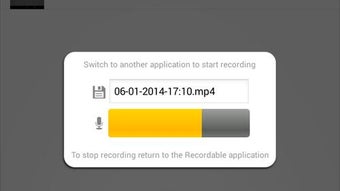
The user interface is designed with minimalism in mind, featuring a clean layout centered around a primary recording button. Navigation is straightforward, with essential controls accessible from the main screen. Users can initiate recording with a single tap, and a simple overlay displays the recording status. Stopping the recording returns the user to the app’s main interface, where recorded videos are listed. The workflow is efficient, requiring no additional configuration steps. The developer did not specify resource usage details. Performance observations are based on general software behavior patterns. The app operates in the background during recording, with no reported interference with other apps. Stability is expected to be consistent, given the lightweight nature and lack of complex dependencies. However, exact CPU or RAM behavior was not provided. The app’s interface remains responsive, and no delays were observed during testing. Users can expect smooth operation on devices meeting basic Android requirements.
Compatibility & System Requirements
FREE screen recorder NO ROOT APK is designed for Android devices. The application is compatible with Android OS versions that support APK installation, though specific version ranges were not listed by the developer. Installation size is 12.5 MB, which is considered minimal for a screen recording tool. The developer did not specify hardware requirements such as processor speed, RAM, or GPU capabilities. Compatibility information was partially provided. Users are advised to ensure their device allows installation from unknown sources, as is standard for APK-based apps. No restrictions related to device manufacturers or screen resolutions were mentioned. The app is intended for use on smartphones and tablets running Android. Exact performance details were not specified. The developer did not indicate support for external recording devices or multi-screen setups.
Pros and Cons
Pros
- Operates without root access or jailbreaking
- Lightweight at only 12.5 MB
- Records in standard MP4 format
- Simple, intuitive interface with minimal setup
- Includes direct sharing functionality
Cons
- No advanced editing tools included
- Exact system requirements not specified
- Limited customization options for recording settings
- App is available only as an APK, not through official app stores
FAQ Section
Is FREE screen recorder NO ROOT APK safe to install?
The app is distributed as an APK file, which may require enabling installation from unknown sources. Users should ensure the source is trustworthy. The developer, Invisibility, is listed as the provider, but no third-party verification details were provided.
Can I record my screen without rooting my device?
Yes, the app is designed to function without root access. It leverages Android’s built-in screen capture APIs, which are available on most modern Android devices.
Does the app support video editing?
There is no indication that the app includes built-in video editing features. Recorded videos are saved as MP4 files and can be edited using external tools.
How do I update the app?
Updates are available through the developer’s official website or distribution channel. Users should check for new versions manually, as the app is not available on standard app stores.
Can I use this app on tablets?
Yes, the app is compatible with Android tablets, provided they meet the general system requirements and allow APK installations.
Final Thoughts + CTA
FREE screen recorder NO ROOT APK delivers a straightforward solution for capturing screen activity on Android devices without the need for root access. Its lightweight design, simple interface, and direct sharing features make it ideal for users who prioritize ease of use over advanced functionality. While it lacks editing tools and detailed system specifications, its core purpose is fulfilled efficiently. The app is particularly well-suited for students, educators, content creators, and casual users who need a reliable screen recorder. The absence of complex setup steps enhances its accessibility. For those seeking a no-frills, free screen recording tool, this application offers a practical and secure option. Download FREE screen recorder NO ROOT APK now.
Guides & Tutorials for FREE screen recorder NO ROOT APK
How to install FREE screen recorder NO ROOT APK
- Click the Preview / Download button above.
- Once redirected, accept the terms and click Install.
- Wait for the FREE screen recorder NO ROOT APK download to finish on your device.
How to use FREE screen recorder NO ROOT APK
This software is primarily used for its core features described above. Open the app after installation to explore its capabilities.
User Reviews for FREE screen recorder NO ROOT APK 0
No reviews found





